Think deeperwith AI
Razvigor turns AI chat into a branching mind-map. Select any text in any message to instantly spawn a new conversation thread, without losing your place. Start free with our built-in AI proxy, upgrade to Pro to unlock Google, OpenAI, and Anthropic models with no API key, or connect your own OpenAI, Claude, Gemini, or OpenRouter keys.
~10,000 free tokens - about 30 messages. No account needed.
Built for non-linear thinking
More than just a chatbot. Razvigor lets you branch, annotate, and navigate AI conversations like a mind-map. Start free with our built-in AI proxy, upgrade to Pro for Google, OpenAI, and Anthropic models with no API key, or bring your own key for OpenAI, Claude, Gemini, or OpenRouter.
4 AI Providers
Free unlocks Google's Gemini via our built-in proxy, no API key needed. Pro unlocks OpenAI and Anthropic through that same proxy too - still no key required. Or connect your own OpenAI, Anthropic, Google Gemini, or OpenRouter key for full control. Switch providers and models from the chat header at any time.
Sidebar Thread Tree
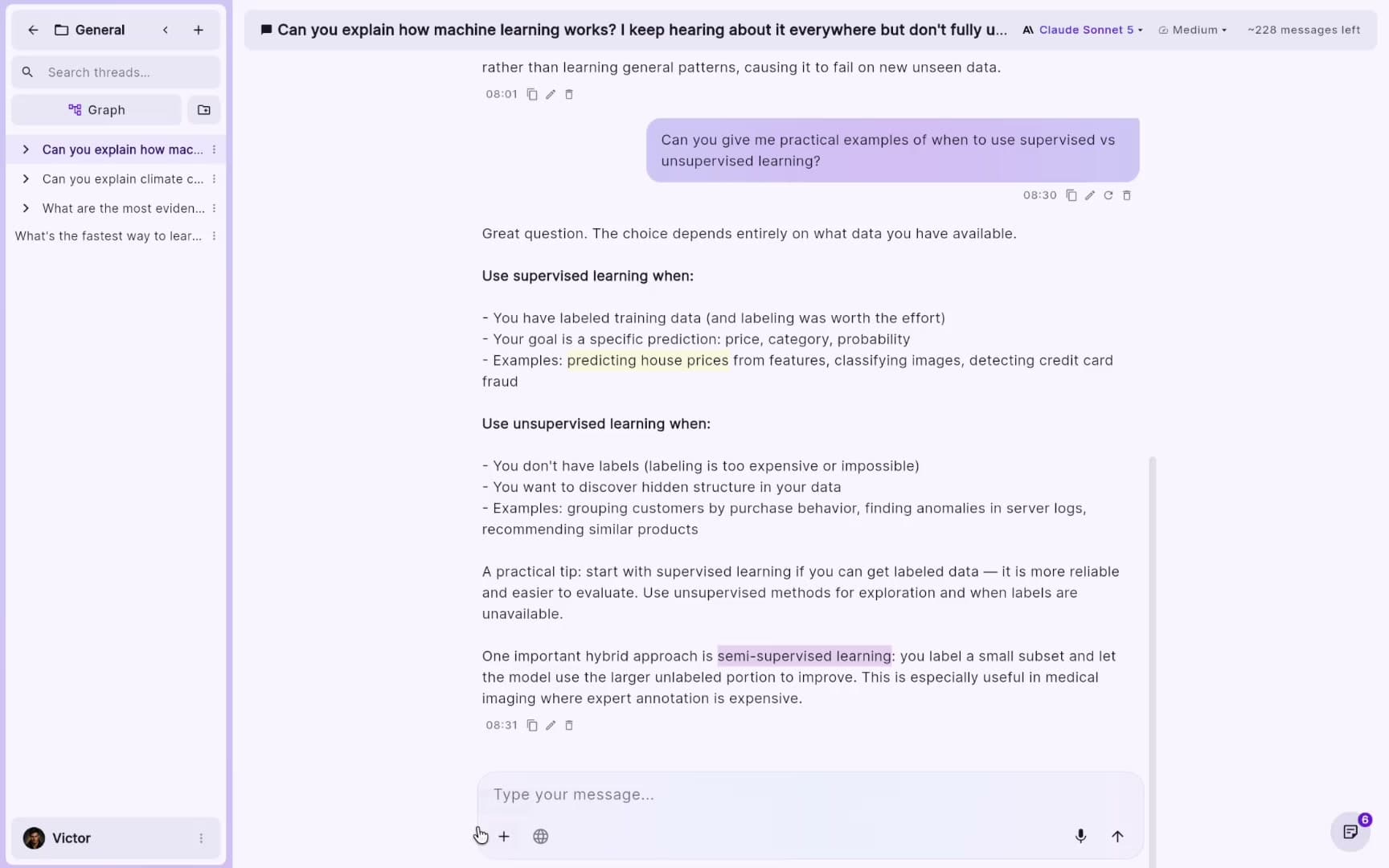
Every thread appears as a collapsible tree in the sidebar, with connecting lines showing parent-child relationships. See exactly how your conversations relate at a glance.
Conversation Branching
Select text in any message. A popup offers Create Branch, Create Note, or Highlight. Branching spawns a new thread pre-seeded with that text, original preserved.
Color Highlights
Highlight selected text in 7 preset colors or create your own custom colors. Highlights appear as colored overlays directly on the message, with a hover preview on desktop.
Inline Notes
Attach written notes to any selected text, color-coded alongside highlights. A dedicated sidebar lets you search, filter by type or color, and click to jump to any annotation.
Import & Export
Export all conversations (threads, messages, annotations, and hierarchy) to a JSON backup file. Restore it anytime with Import. Cloud sync via Firebase keeps everything in step across devices.
Projects & Folders
Group your threads into projects, and nest folders inside them to keep large workspaces tidy. Move any thread or branch to a different project or folder at any time.
Interactive Branch Graph
Open any project as a zoomable, pannable graph of every thread, folder, and branch. Expand or collapse nodes, click any node to jump straight into that thread, or go full screen for the bird's-eye view.
Quick Explain
Select any text and choose Explain for a short, streamed AI explanation right in a floating popup - no new thread, no losing your place in the conversation.
How Razvigor works
A workflow built around non-linear thinking. Explore any direction without losing your thread.
Start chatting right away, switch models anytime
Start chatting immediately with our built-in AI proxy - free with Google Gemini, no API key needed. Upgrade to Pro to unlock OpenAI and Anthropic through that same proxy too, still with no key required. Or connect your own OpenAI, Anthropic, Google Gemini, or OpenRouter key for full control.
- ✓Free tier included, no API key required to get started
- ✓Pro adds OpenAI and Anthropic - still no API key needed
- ✓Bring your own key for OpenAI, Claude, Gemini, or OpenRouter
- ✓Switch models mid-conversation
Highlight and annotate any response
Select text in any message to highlight it in one of 7 preset colors or a custom color, or attach a written note. A dedicated sidebar shows all annotations with search and color filtering. Click any entry to jump to its message.
- ✓7 preset colors plus custom color support
- ✓Written notes color-coded alongside highlights
- ✓Search all annotations across the thread
Branch into any direction without losing your place
Select text in any message and choose "Create Branch". A new thread opens pre-seeded with either the selected text or a summary of the whole conversation, your choice. The original thread is preserved. Navigate the full tree from the collapsible sidebar.
- ✓Branch from any message in any conversation
- ✓Unlimited depth, branches can branch further
- ✓Sidebar tree shows all threads with parent-child lines
Organize with projects and folders
Group related threads into projects, and nest folders inside them to keep large workspaces tidy. Use "Move to…" on any thread to relocate it - moving a branch detaches it from its parent conversation, so it stands on its own.
- ✓Projects hold folders and root conversations
- ✓Folders can nest inside other folders
- ✓Move any thread or branch anytime with "Move to…"
Visualize every branch as an interactive graph
Open any project as a graph: threads, folders, and branches laid out automatically, left to right. Expand or collapse nodes to focus on what matters, zoom and pan freely, or pop the whole graph into full screen.
- ✓One graph per project, generated automatically
- ✓Expand or collapse any node to show or hide its branches
- ✓Click a node to jump straight into that thread
Get instant answers without leaving the message
Select any text and choose Explain for a short explanation that streams in right inside the popup. It's a quick detour, not a new thread - your conversation stays exactly as it was.
- ✓Explains any selection in 2-3 sentences
- ✓Streams in live, right where you're reading
- ✓Doesn't create a branch or alter your history